![BLAZE-Logo-Blue.svg]](https://help.blaze.me/hubfs/BLAZE-Logo-Blue.svg)
BLAZE Growth is an all-in-one marketing and loyalty platform built to turn your cannabis dispensary shoppers into lifelong regulars. Fully integrated with Greenline and BLAZE ECOM, it makes sending targeted SMS deals, launching reward programs, and boosting customer retention completely automatic and hassle-free
Once BLAZE Growth is added to your product stack, the Greenline Onboarding Team will reach out to get you started.
Sign up for BLAZE Growth HERE
⚠️ The features of Growth Loyalty described in this article allow for customizable reward models that may not comply with regulations in every province. This content is provided for informational purposes only and does not constitute legal advice. Users are solely responsible for ensuring their reward programs comply with all local regulations.⚠️
Here's a quick overview of the steps to getting started with Blaze Growth Loyalty
1. Gaining Access to BLAZE Growth :
When sign-up is complete, the BLAZE Team will reach out to enable BLAZE Growth and provide access to the Growth Dashboard.
2. Configure Core Point Rules:
Head to Loyalty > Configuration to establish how customers earn and keep their points:
-
Base Point Rate: Set how many points customers earn per dollar spent.
-
Expiration Window: Choose how many months points remain valid before expiring.
-
Stacking Rule: Choose how tier multipliers combine with promotional bonuses (Tier + Highest or Highest Only).
3. Set Up Loyalty Tiers:
Gamify customer retention by customizing your default membership levels (e.g., Silver, Gold, Platinum):
-
Define the Minimum Points required to unlock each tier.
-
Assign a Multiplier to boost point earning for VIP members.
-
Customize visual branding (icons and card colours) for customer wallet passes and profiles.
Learn about Creating Loyalty Tiers here!
4. Create Rewards:
Build the catalogue of perks customers can redeem using their accumulated points:
-
Define the reward types (e.g., dollar discounts, percentage discounts, or free item perks).
-
Set point redemption thresholds.
-
Once active, rewards will automatically apply at checkout to eligible orders without extra steps at the POS.
Learn about Creating Loyalty Rewards here!
5. Go Live & Turn On Integration:
Once your settings, tiers, and rewards are fully configured:
-
Toggle Enable Growth Loyalty to Active.
-
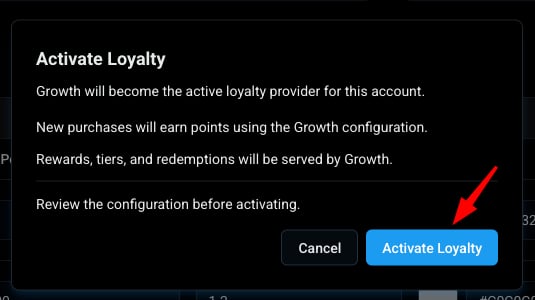
Confirm activation. Your new loyalty program is now live across your POS and e-commerce channels!
Activating Growth disables BLAZE Legacy Loyalty. Existing Greenline Loyalty settings cannot be automatically imported and must be configured in Growth.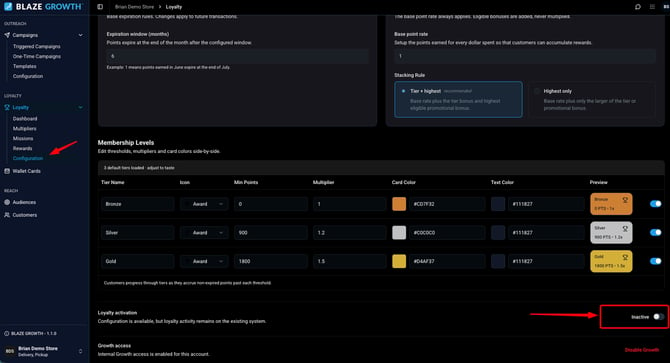
Need Help or Need to Roll Back?
If you ever need to disable Growth Loyalty or temporarily revert to BLAZE Legacy Loyalty, contact the Support team for assistance.
Dashboard
Account-level Loyalty Performance
Once BLAZE Growth & Loyalty is enabled, you'll manage everything from the Growth dashboard instead of your Greenline Dashboard.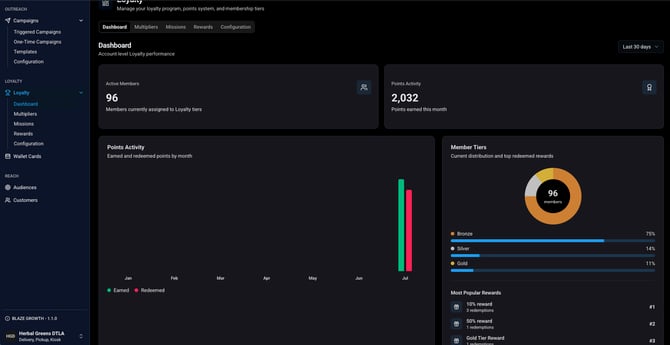
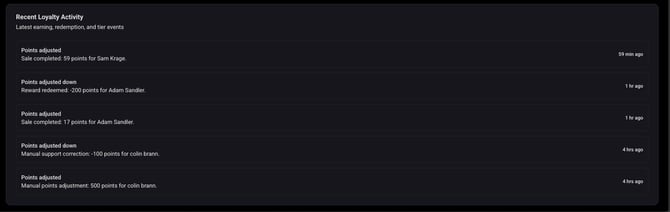
- Active Members - Members currently assigned to Loyalty tiers
- Points Activity - Points earned this month/earned and redeemed points by month
- Member Tiers - Current distribution and top redeemed rewards
- Recent Loyalty Activity - Latest earning, redemption, and tier events
Ready to turn shoppers into regulars? Growth Loyalty puts your marketing and loyalty on autopilot.