![BLAZE-Logo-Blue.svg]](https://help.blaze.me/hubfs/BLAZE-Logo-Blue.svg)
Instead of offering a static base earning rate, Multipliers enable you to create time-limited or condition-based point bonuses that incentivize shopping during specific times, through preferred sales channels, or during promotional campaigns.
⚠️ The features of Growth Loyalty described in this article allow for customizable reward models that may not comply with regulations in every province. This content is provided for informational purposes only and does not constitute legal advice. Users are solely responsible for ensuring their reward programs comply with all local regulations.⚠️
How to Access Multipliers
Navigate to Growth > Loyalty > Multipliers in your BLAZE backend and select + New Rule to create a Multiplier rule.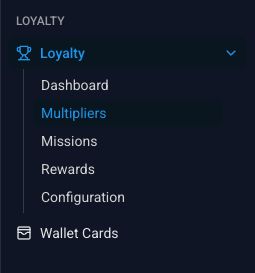
How Multipliers Work
When setting up a Multiplier, you define a Rule Name, a Boost Value (e.g., 2x points), and one or more Conditions that must be met for the bonus rate to apply.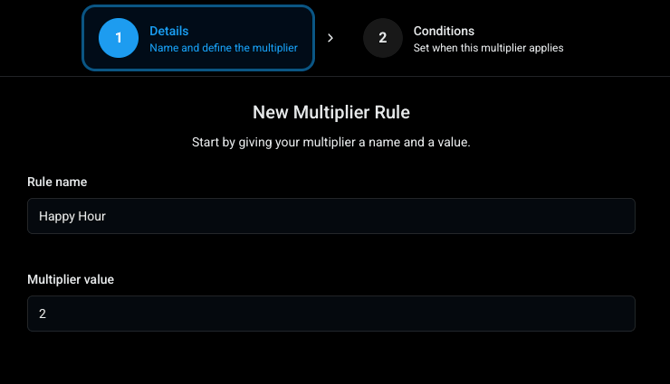
Condition Types
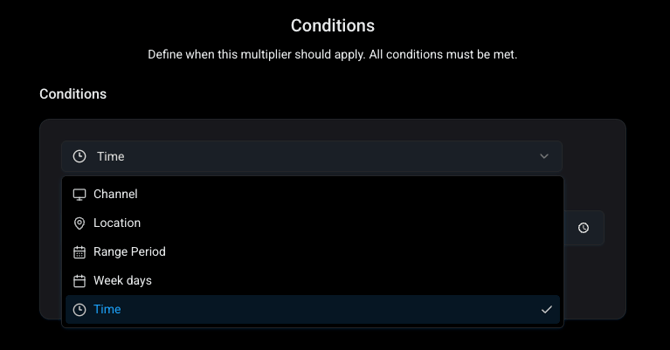
You can trigger Multipliers using individual conditions or stack them together to target specific shopping behaviours (e.g., 3x points for in-store purchases made on Mondays between 4:00 PM and 6:00 PM).
| Condition Type | Description / Usage Example |
| By Channel | Restrict to specific channels (e.g., Online only, In-store only) |
| By Location | Limit to specific store locations |
| By Day | Apply on specific days of the week (e.g., Mondays only) |
| Range Period | Set start and end dates/times for limited-run campaigns |
| By Time | Target specific time windows (e.g., Happy Hour between 4:00 PM and 6:00 PM) |
| By Member Group | Offer exclusive boosts to specific customer segments or tiers |
| By Brand |
Reward purchases of designated product brands |
More to Come: Multipliers are currently scheduled for an upcoming feature release as we continue expanding BLAZE Growth. Stay tuned for future updates here!