![BLAZE-Logo-Blue.svg]](https://help.blaze.me/hubfs/BLAZE-Logo-Blue.svg)
From the Org Product List, click Import to open the Import/Export products window and select the Bulk Create Products tab. At the org level, only bulk create is available — bulk update and bulk price tools are on their way.
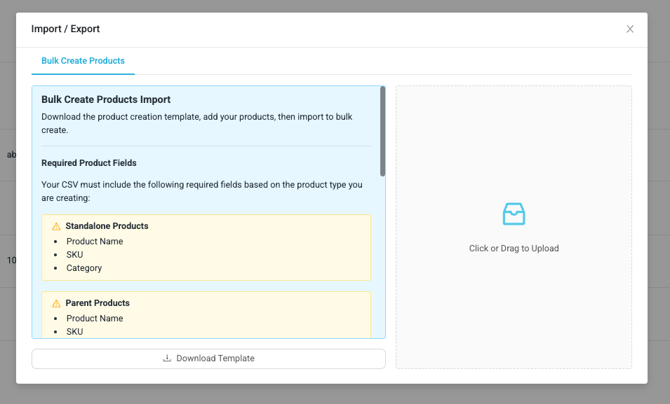
- Prepare your CSV using the product import template (the same column layout you use for company-level imports — product name, SKU, category, pricing, and so on).
- Drag the file into the dropzone (or click to browse) on the Bulk Create Products tab.
- The file is validated as a whole. If everything checks out you’ll see the confirmation “Your file has been successfully validated”, and your products are created in the background across all companies in your organization.
Validation: All or Nothing
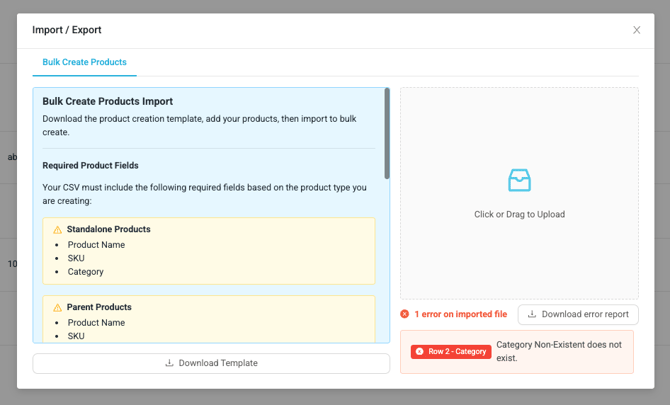
Org bulk create validates the entire file before creating anything. If any row fails — a duplicate SKU or product name, a missing required field like SKU, name, or category, an invalid image URL, or a tax group that doesn’t exist — no products are created and the errors are listed right in the window, one entry per problem row.
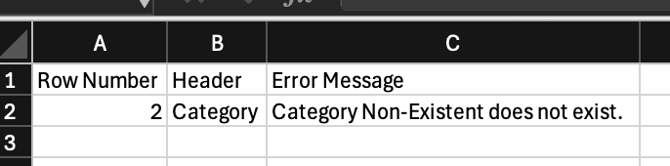
Click Download error report to export the full list as a CSV with three columns — Row Number, Header, and Error Message — so you can fix your file and re-upload it.
What Happens After a Successful Upload
- Each product in your file is created once per company in your organization, with variants included, and linked together as one org product group.
- Creation runs in the background — you can keep working while it completes. Give larger files a few minutes, then refresh the org product list.
- Bulk import is create-only: it won’t update products that already exist. To change existing org products, edit them from the org product list (bulk actions coming soon)
FAQ - Frequently Asked Questions
|
Question |
Answer |
|
My file had one bad row. Were the other products created? |
No. Org bulk create is all-or-nothing — fix the rows in the error report and upload the file again. Nothing was created, so re-uploading won’t make duplicates. |
|
Do I upload once per company? |
No — one upload creates the products across every company in your organization automatically. |
|
Can I bulk-update existing products this way? |
Not yet at the org level. The org bulk create import supports creating new products only. |
Need a hand? If something doesn’t look right or you’re not sure how your organization is set up, reach out to your BLAZE representative or contact support — we’re happy to help.