![BLAZE-Logo-Blue.svg]](https://help.blaze.me/hubfs/BLAZE-Logo-Blue.svg)
Location first
On the dashboard, go to Purchase Orders, then click Add Purchase Order in the top right corner.
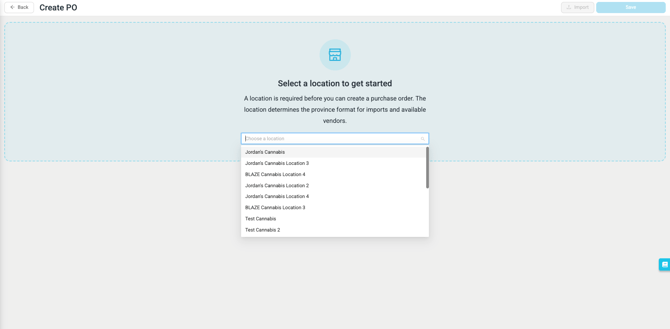
You will see the location selection screen.
- Click the drop down for Choose a location and pick the destination store.
- Once a location is selected, the PO opens with the correct provincial import template, i.e. BC, AB, ON, or N/A)
Editing an existing purchase order skips this step — the location is already set.
One Dropdown for Every Location in Your Organization
The location dropdown isn’t limited to the company you’re logged into, it lists locations from every company in your organization.
Pick any location and the PO is automatically filed under the company that owns it — no switching dashboards.
You will only see locations where you have the Can view purchase orders permission enabled. If your access covers some companies but not others, the flow simply shows the locations you have access to.
Make sure every location has its province set under Settings > Locations; the province controls which import format applies.
FAQ - Frequently Asked Questions
|
Question |
Answer |
|
Why is the Import button greyed out? |
You haven’t selected a location yet. The location determines the provincial import format, so it has to come first. |
|
Can I create a PO for a store in another company of my organization? |
Yes — the location dropdown covers all org locations you have permission to see, grouped by company. The PO is filed under the right company automatically. |
|
Why don’t I see some locations in the dropdown? |
The list is filtered by your Can view purchase orders permission. Ask your admin if a location you manage is missing. |
|
What decides whether I get the BC, AB, or ON import format? |
The province of the location you selected for the PO. |
Need a hand? If something doesn’t look right or you’re not sure how your organization is set up, reach out to your BLAZE representative or contact support — we’re happy to help.