![BLAZE-Logo-Blue.svg]](https://help.blaze.me/hubfs/BLAZE-Logo-Blue.svg)
Configuration - General Settings
Log into the BLAZE Growth dashboard HERE
Go to Loyalty > Configuration
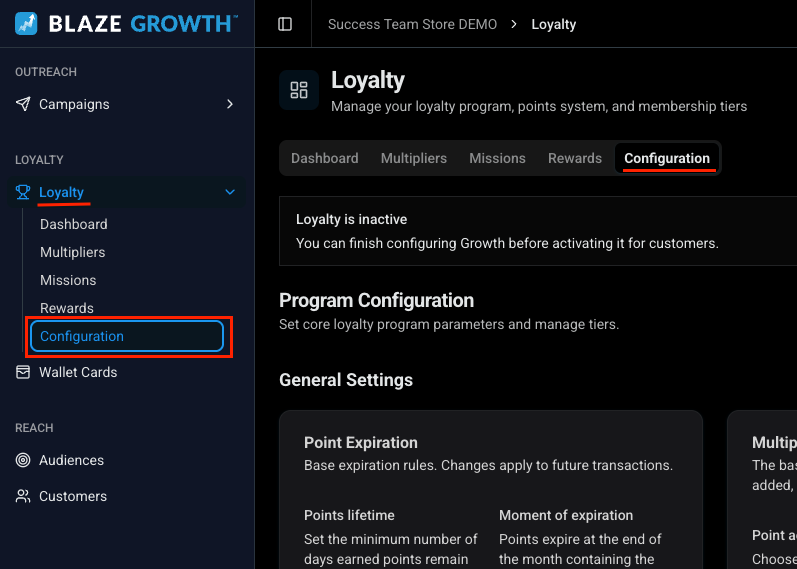
Configuration
Under Program Configuration, you may set the loyalty Point Expiration and Multiplier Rules.
Point Expiration:
Points Lifetime - Set the desired number of days, between 1 and 36,500 days, that loyalty points remain valid on a customer's account.
Moment of Expiration - currently locked to "End of month", this controls at when in the month that points will expire.
For customers in Ontario, some loyalty points cannot expire. Explained HERE.
To avoid point expiry, input a day-value such as 36,500 (i.e. 100 years).
Multiplier Rules:
Point Accrual - set how points are earned, either Per $ Spent or Per Visit
Base Point Rate - set how many points are earned relative to the Point Accrual setting
- Stacking Rule
Determines how bonus points combine with the base rate.- Tier + highest(recommended): Base rate plus the tier bonus, plus the highest eligible promotional bonus.
I.e Points earned per dollar = Base Point Rate + (Tier Multiplier - 1) - Highest only: Base rate plus whichever is larger — the tier bonus or the promotional bonus.
- Tier + highest(recommended): Base rate plus the tier bonus, plus the highest eligible promotional bonus.
Example:
Base Point Rate 1 + (Silver Tier Multiplier 1.1 - 1) = 1.1 Point earned per dollar
Base Point Rate 1 + (Gold Tier Multiplier 1.25 - 1) = 1.25 Point earned per dollar
For those who have migrated their Greenline Loyalty Customers:
Migrated points will be input with an expiration start date for the same day that Growth Loyalty is enabled.
e.g. Growth Loyalty is enabled July 1st and expiration is set to 1 month; all migrated points will expire on July 31st at midnight
If you need to disable your new Growth Loyalty and revert to Greenline Loyalty. please contact the Greenline Customer Success or Support Team.
Membership Levels
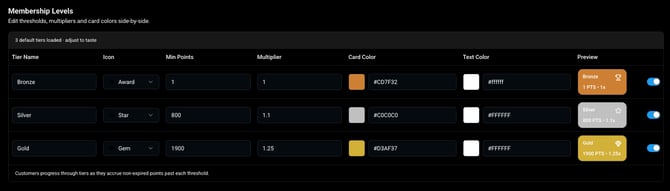
3 default tiers are available to customize.
- Tier Name - Name your tiers/levels
- Icon - select an icon to go with this tier
- Min Points - points needed to enter this tier
- Multiplier - points earned while at this tier level
- Card Colour - colour you want your card to be
- Card Colours are set on the ECOM Customer's Profile and Wallet Cards
- Text Colour - text colour on loyalty card
- Text Colours are set on the ECOM Customer's Profile and Wallet Cards
- Preview - preview of your loyalty card for each tier
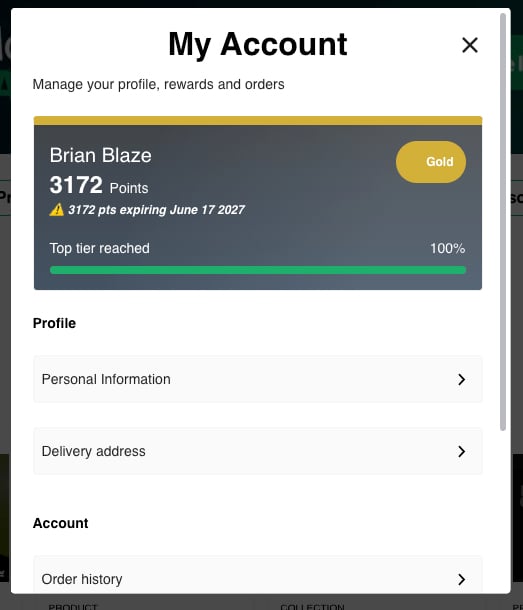
Once your Loyalty Tiers and Rewards are set up, your BLAZE Growth loyalty program is ready to use!
Learn more about how to Configure Loyalty Rewards Here!