![BLAZE-Logo-Blue.svg]](https://help.blaze.me/hubfs/BLAZE-Logo-Blue.svg)
Why This Helps
Provinces often require separate identifiers for the same product — for example, an OCS SKU in Ontario and an AGLC SKU in Alberta on the same “Pink Kush 3.5g" will be different.
Rather than maintaining a separate product for each province, you can keep one product and add overrides. The product becomes “location aware”: when a store scans it, the point of sale uses that location’s province-specific SKU and/or barcode. Also, provincial compliance reporting reflects the correct identifier for each location.
Where to find it
Open any product and go to the SKU & Barcode tab. (If you managed barcodes before, this is the tab that used to be called simply “Barcode”).
Everything below lives on this one tab.
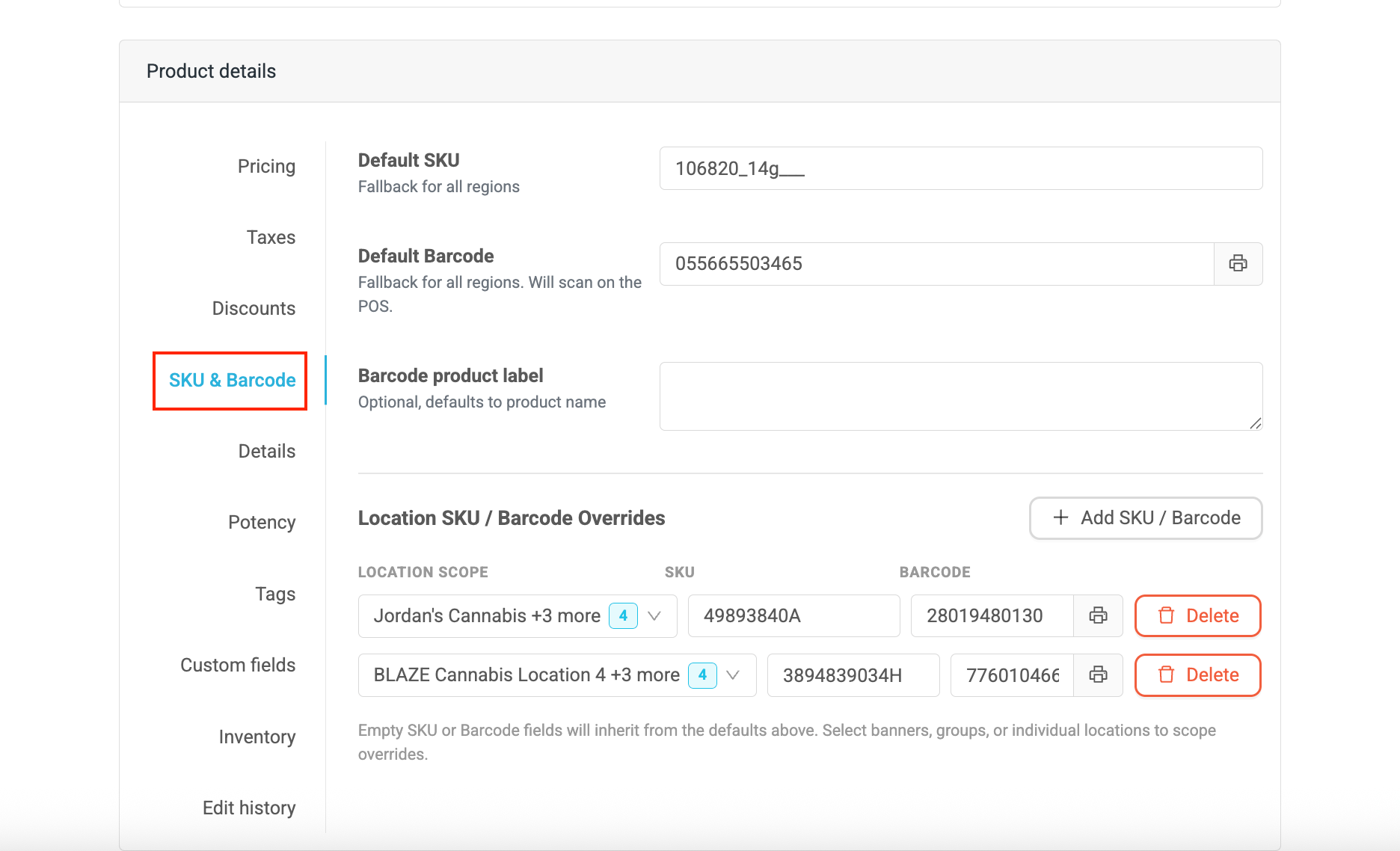
Default SKU and barcode
Every product has a Default SKU and a Default barcode. The barcode field is labeled “Default barcode (used at locations without an override)”. Any location that doesn’t have its own override uses these defaults.
Adding a Location Override- On the SKU & Barcode tab, click + Add SKU/Barcode.
- Choose the location that the override applies to. For quick selection, you can pick by organization, banner, or location group as well as by individual location.
- Enter the override SKU and barcode. You can generate a barcode here if you don’t already have one.
- Click Save. Each override appears on its own row with a scope chip showing which location it belongs to.
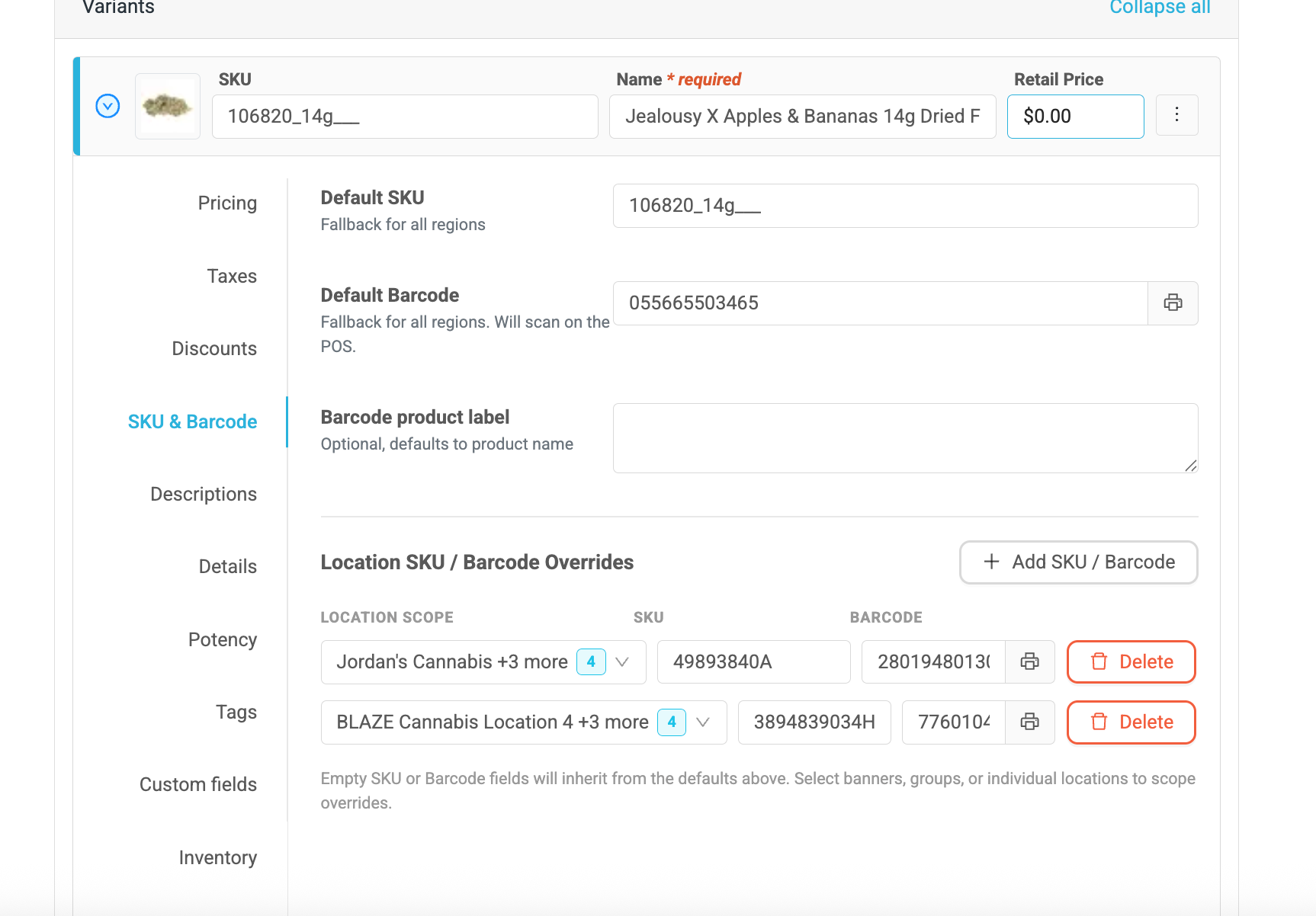
For cannabis products, each location can have one SKU and one barcode. This keeps identifiers unique per location, which is required for compliance. If you try to add an override for a location that already has one, you will see an alert that the location already has a barcode assigned and the duplicate won’t be created.
The same SKU or barcode value is allowed across different locations — only duplicates within the same location are blocked.
Coming later: Support for multiple SKUs and barcodes per location for non-cannabis products.
How Overrides Resolve at the Point of Sale and in Reporting
Each location keeps its own SKU and barcode. When a product is scanned at a store, the point of sale pulls up that location’s specific barcode, and compliance reporting uses that location’s identifiers. Locations without an override fall back to the product’s default SKU and barcode.
Seeing Your Overrides at a GlanceOn the product, expand or hover over the SKU and barcode fields to see the full list of identifiers set for each location — the same quick hover view you may already use for multi-location pricing.
Viewing Overrides on a Company ProductWhen you’re working in a single company’s product, the SKU & Barcode tab shows a read-only panel of any organization-managed overrides that apply to that company’s locations. It’s labeled “Managed by your organization” with a Read only badge, so you can see why a product carries a different SKU or barcode at a location without changing it there.
- The table lists each location with its SKU override and barcode override.
- Where a value isn’t overridden, it shows Default.
- Locations not listed inherit the product’s default SKU and barcode.
Overrides are always edited on the organization product — that’s the single source of truth.
A note on permissionsIf your access is scoped to certain regions or tiers, you’ll only see overrides for the locations you’re entitled to manage.
FAQ - Frequently Asked Questions
|
Question |
Answer |
|---|---|
|
Can one product have different SKUs in different provinces? |
Yes — that’s exactly what overrides are for. Set a different SKU and barcode per location, and each store uses its own. |
|
Which SKU or barcode is used when a product is scanned? |
The location’s override, if one is set; otherwise the product’s default. Reporting follows the same rule. |
|
Why can’t I add a second barcode to a cannabis product at the same location? |
Cannabis products are limited to one SKU and barcode per location to keep identifiers unique for compliance. You will get an alert if a location already has one. |
|
Can I reuse the same barcode at two different locations? |
Yes. The same value is allowed across different locations; only duplicates within the same location are blocked. |
|
Why can’t I edit an override on a company product? |
Organization-managed overrides are read-only at the company level. Edit them on the organization product, which is the source of truth. |
Need a hand? If something doesn’t look right, reach out to your Greenline representative or contact support — we’re happy to help.